3D Printing is available at Lane Cove Library by prior arrangement using Ultimaker machines.
Jobs may be submitted in .STL file format or referred from a website such as Thingiverse.
The 3D printing fee is $5.50 per job plus $0.10 per minute ($6 per hour) of print time.
The filament used is PLA and colours are subject to availability.
To book or obtain a quotation email the Library - library@lanecove.nsw.gov.au.
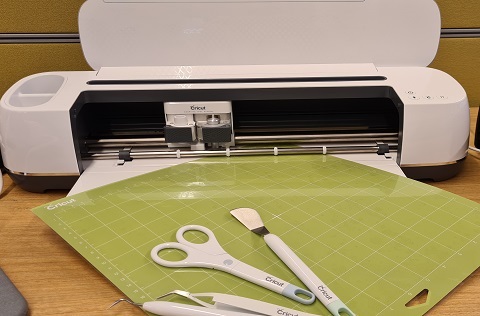
A Cricut is a computer controlled cutting machine that can cut several different materials for craft projects. The Cricut uses either a blade, rotary cutter, pen or scoring tool to complete the design. Available for use at Lane Cove Library and St Leonards Library Makerspace events (see News & Events page for bookings).
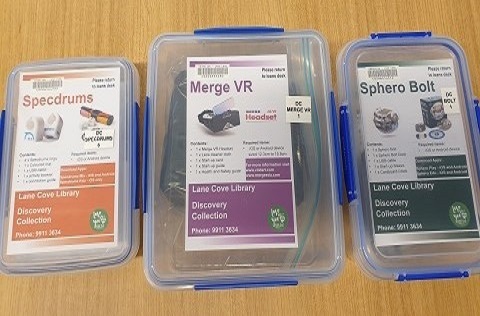
This lending collection consists of kits that include:
- Makey Makey's are designed to connect everyday objects to your PC. Use scratch coding to create music and games with an interactive controller.
- Merge VR headset is compatible with most modern iOS and Android smartphones.
- Micro:bit Go is a pocket-sized computer that has a LED light display, buttons and sensors you can code, customise and control to bring your digital ideas, games and apps to life.
- Ozobots is a programmable robot that can be coded by using an App or colour.
- Retro Gaming Consoles
- Specdrums are app-enabled musical rings that make the world your instrument by turning colours into sounds.
- Sphero BOLT is a programmable robot ball that you can drive and code.
Available at Lane Cove Library, Greenwich Library and St Leonards Library.
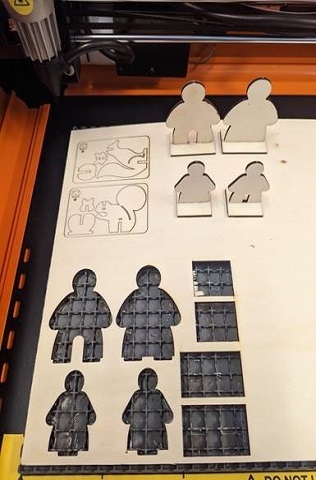
A laser cutter is a tool that uses a focused beam of laser light to cut and engrave onto materials. The fine beam of light is focused to a very fine point, thinner than a human hair, allowing very high accuracy. Available for use at Lane Cove Library and St Leonards Library Makerspace events (see News & Events page for bookings).
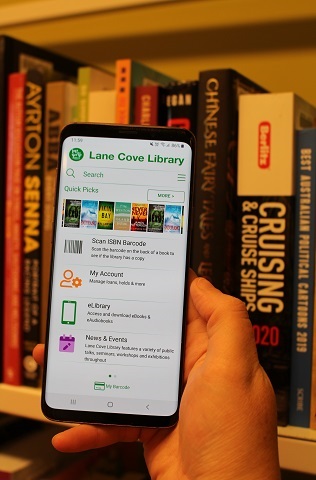
Download the Lane Cove Library App to your phone or tablet to:
- Save your Library barcode to your phone and use it when you borrow
- Check your Library account and link other family members cards
- Search the catalogue and reserve items
- Find and book Library events
- Scan the ISBN of any book and check to see if it is held in the Library
There are also links to:
To download the App, go to your App store and search for Lane Cove Libraries.
Sign in by scanning your Library card barcode or type in the number beginning with X020...and your pin or password.
Use the EFTPOS terminal at the Monitor Kiosk at Lane Cove, St Leonards or Greenwich Libraries to pay for printing, photocopying, book sale items, Library products and fees and charges.
You can also add credit to your Library card for future use.
Self-service photocopying facilities are available at Lane Cove, St Leonards and Greenwich Libraries.
Add credit to your Library card or Guest card using the EFTPOS terminal at the Monitor Kiosk.
Use your Library card or Guest card to log in to copier - standard printing prices apply.
A4 (Black & White) - $0.20
A4 (Colour) - $1.00
A3 (Black & White) - $0.40
A3 (Colour) - $2.00
Note: Double-sided printing is charged for each side of the page printed.
You can print from your phone, laptop, tablet or other device.
There are two options:
- Email to print (available only at Lane Cove and St Leonards)
Email your document to LCprint@monitorlibrary.com
You will receive a return email with a Job ID which is current for 4 hours.
Enter the Job ID on the Monitor Kiosk and pay using EFTPOS or credit on your Library card.
The document should print from the copier straight away.
- Web Print
Connect to the Library Wi-Fi and login to Web-Print with your Library Card or Guest Card.
Follow the prompts on the screen to upload your document.
Log on to the copier to release your print job.
Public Computers are available at Lane Cove, St Leonards and Greenwich Libraries.
Log in using your Library card and password or print a free Guest card from the Monitor Kiosk.
Computers can be used to print documents, search the Internet, access web-based email, Word, PowerPoint and Excel programs.
Time limits apply. Charges apply for printing.
Self-service scanning is available for free at the photocopiers at Lane Cove, St Leonards and Greenwich Libraries.
Log into the copier using your Library card or print a free Guest card from the Monitor Kiosk. Documents can be scanned to an email or your USB.
Lane Cove Council provides free Wi-Fi access at Lane Cove, St Leonards and Greenwich Libraries.
Follow the instructions on display in the Library by either scanning the QR code or entering a password.
Your device should automatically connect to the network during your subsequent visits.
By connecting to the Lane Cove Council Wi-Fi you accept the terms and conditions below:
I agree to abide by the Library User Guidelines, Rules and Regulations and acknowledge that this wireless internet service is not to be used for illegal, actionable or criminal purposes. Nor should it be used to access inappropriate material that contains sexually explicit content or that degrades a specific gender, ethnic or racial group. I agree to abide by all applicable laws regarding copyright.
I understand that internet security cannot be guaranteed and that Lane Cove Council will not be responsible for any virus/spyware infection/damage/loss to data or equipment whilst using this service.
No personal details are collected however the MAC address of your device along with the web activity details are recorded. This information may be made available to the council, State Libraries and/or the police upon request.
I understand Lane Cove Council retains the right to limit my access to the Internet if I am found to be in breach of any of the above.
NOTE - use of this free Wi-Fi connection is restricted to 3 GB download limit per day